Codex 移动端使用第三方中转站

核心原理
利用 Codex 客户端 Auth层(负责账户验证、权益)与 Model层(负责实际对话请求)解耦的设计。
-
Auth 层:继续使用 ChatGPT 账号登录,以获得其账户身份和所有功能权益。
-
Model 层:通过配置,将其请求指向支持 OpenAI
responsesAPI 的第三方中转服务。
准备工作
- 账户:一个有效的 ChatGPT 账号(免费版即可)。
- 中转服务:一个支持 OpenAI
responsesAPI 模式的中转站账号 - 配置文件:找到 Codex 本地的两个配置文件准备修改:
* ~/.codex/auth.json
* ~/.codex/config.toml
详细配置步骤
第一步:正常登录
首先,在 Codex 客户端中,像平常一样登录你的 ChatGPT 账号,并确保登录成功、状态正常。
第二步:修改认证配置 (auth.json)
找到并编辑文件 ~/.codex/auth.json。
关键修改项:
-
将
"auth_mode"的值改为"chatgpt"。 -
将
"OPENAI_API_KEY"的值设为null。
目的:确保客户端使用 ChatGPT 方式进行身份验证,并且不使用官方的 OpenAI API Key,从而为切换模型请求层铺平道路。
第三步:修改模型提供商配置 (config.toml)
找到并编辑文件 ~/.codex/config.toml,在文件的末尾追加以下配置段落:
[[providers]]


id = "MuskAI" # 提供商ID,可自定义


name = "MuskAI" # 提供商显示名称,可自定义


base_url = "在官网用户中心 -【API密钥】页面复制的 Base URL"


models = [] # 保持为空数组,模型列表会从中转站动态拉取


experimental_bearer_token = "sk-xxxxxxxxxxxx" # 替换为你的 API Key


wire_api = "responses" # 必须设置为 "responses"


requires_openai_auth = true # 必须为 true,用于绕过客户端的某些检测
配置项解释:
base_url:登录官网后,在用户中心 -【API密钥】页面复制的 Base URL。experimental_bearer_token:你在该中转服务的 API Key。wire_api:这是最关键的一项,必须设置为"responses"。这指示 Codex 使用 OpenAI 的/v1/responses端点格式发送请求,而非常见的/v1/chat/completions。大部分中转服务需要特别配置才能支持此端点。requires_openai_auth:必须设置为true。这会使客户端认为当前仍在使用 OpenAI 的认证,从而顺利通过内部检查,维持 ChatGPT 账户的登录状态和功能。
第四步:验证配置
- 重启 Codex 客户端,使配置生效。
- 在客户端中发送一条测试消息。
- 登录MuskAI服务控制台,查看“用量”或“请求日志”。如果能看到刚刚测试对话产生的 API 调用记录,则说明配置成功,请求已被转发到第三方服务。
重要注意事项
- 历史记录丢失:切换模型提供商后,之前的所有对话历史记录会消失。因为对话记录是与特定的模型提供商绑定的,更换后无法读取之前的记录。
- 模型名称格式:在中转站(如 MuskAi)中配置可用模型时,模型名称需要包含提供商前缀。例如,如果你想使用 GPT-5.4,模型名称应配置为
openai/gpt-5.4,而不仅仅是gpt-5.4。 - API 端点要求:该方法成功的关键在于,你选择的第三方中转服务必须支持 OpenAI 的
/v1/responses端点。如果中转站只支持常见的/v1/chat/completions端点,则 Codex 的请求会失败。 - 多端同步:此配置修改后,Codex 的桌面端和移动端的功能与状态将保持同步。
最终效果
通过以上配置,你实现了:
- 身份与功能:客户端界面、账户权益(如 Plus 标志、插件、移动版解锁)仍由你的原始 ChatGPT 账户提供。
- 算力与模型:所有你发起的对话请求,其实际处理的计算资源和模型,都来自于你配置的第三方中转 API 服务。
这使得你可以在享受 ChatGPT 官方客户端体验的同时,灵活地选用更经济、更快或更定制化的模型服务。
补充
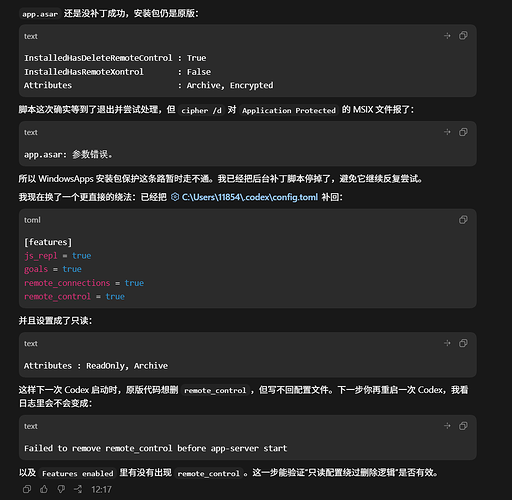
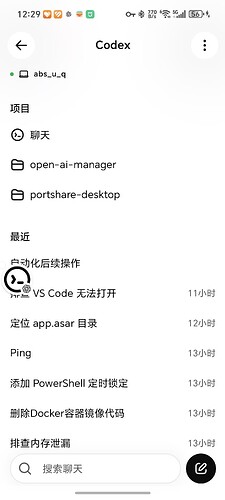
看到很多人写的修改配置文件,但是不能连接windows端的codex,是因为windows端的codex它默认会删除配置字段。把配置文件改成只读,会让codex修改不了配置文件。这样就可以用手机访问codex了。放图片: 改成只读配置:
连接完成图片:
脚本文件,改成ps1后缀
$ErrorActionPreference = "Stop"


$workspace = "C:\Users\11854\Documents\Codex\2026-05-16\chatgpt-codex"
$package = Get-AppxPackage OpenAI.Codex
if (-not $package) {
  throw "OpenAI.Codex package not found."
}


$asar = Join-Path $package.InstallLocation "app\resources\app.asar"
$patched = Join-Path $workspace ("app.asar.patched-" + $package.Version)
$backup = Join-Path $workspace ("app.asar.backup-" + $package.Version + "-" + (Get-Date -Format "yyyyMMdd-HHmmss"))
$log = Join-Path $workspace "patch-current-codex-asar.log"
$config = "C:\Users\11854\.codex\config.toml"


function Log($message) {
  "$(Get-Date -Format o) $message" | Add-Content -LiteralPath $log -Encoding UTF8
}


function IndexOfBytes([byte[]]$haystack, [byte[]]$needle, [int]$start) {
  for ($i = $start; $i -le $haystack.Length - $needle.Length; $i++) {
    $ok = $true
    for ($j = 0; $j -lt $needle.Length; $j++) {
      if ($haystack[$i + $j] -ne $needle[$j]) {
        $ok = $false
        break
      }
    }
    if ($ok) { return $i }
  }
  return -1
}


function New-PatchedAsar {
  $bytes = [System.IO.File]::ReadAllBytes($asar)
  $encoding = [System.Text.Encoding]::UTF8
  $text = $encoding.GetString($bytes)
  $pattern = "function xV(e){return Object.hasOwn(e,``remote_control``)||SV(e.features)&&Object.hasOwn(e.features,``remote_control``)}"
  $patchedPattern = "function xV(e){return Object.hasOwn(e,``remote_xontrol``)||SV(e.features)&&Object.hasOwn(e.features,``remote_xontrol``)}"
  $needle = "remote_control"
  $replacement = [System.Text.Encoding]::UTF8.GetBytes("remote_xontrol")


  $idx = $text.IndexOf($pattern, [System.StringComparison]::Ordinal)
  if ($idx -lt 0) {
    if ($text.IndexOf($patchedPattern, [System.StringComparison]::Ordinal) -ge 0) {
      Log "Installed app.asar already appears patched."
      return $false
    }
    throw "Target xV function pattern not found."
  }


  $positions = @()
  $pos = $idx
  $end = $idx + $pattern.Length
  while (($pos = $text.IndexOf($needle, $pos, [System.StringComparison]::Ordinal)) -ge 0 -and $pos -lt $end) {
    $positions += $encoding.GetByteCount($text.Substring(0, $pos))
    $pos += $needle.Length
  }
  if ($positions.Count -ne 2) {
    throw "Expected 2 remote_control occurrences in target xV function, found $($positions.Count)."
  }


  foreach ($p in $positions) {
    [Array]::Copy($replacement, 0, $bytes, $p, $replacement.Length)
  }


  [System.IO.File]::WriteAllBytes($patched, $bytes)
  Log "Created patched asar: $patched offsets=$($positions -join ',')"
  return $true
}


function Ensure-ConfigFlag {
  $bytes = [System.IO.File]::ReadAllBytes($config)
  $text = [System.Text.Encoding]::UTF8.GetString($bytes)
  if ($text.Length -gt 0 -and [int][char]$text[0] -eq 0xFEFF) {
    $text = $text.Substring(1)
  }
  $changed = $false
  if ($text -match '(?m)^\s*remote_control\s*=') {
    if (($bytes.Length -ge 3 -and $bytes[0] -eq 0xEF -and $bytes[1] -eq 0xBB -and $bytes[2] -eq 0xBF)) {
      $encoding = [System.Text.UTF8Encoding]::new($false)
      [System.IO.File]::WriteAllText($config, $text, $encoding)
      Log "Removed UTF-8 BOM from config.toml."
    }
    return
  }
  if ($text -match '(?m)^\s*remote_connections\s*=\s*true\s*$') {
    $text = $text -replace '(?m)^(\s*remote_connections\s*=\s*true\s*)$', "`$1`r`nremote_control = true"
    $changed = $true
  } elseif ($text -match '(?m)^\s*\[features\]\s*$') {
    $text = $text -replace '(?m)^(\s*\[features\]\s*)$', "`$1`r`nremote_control = true"
    $changed = $true
  } else {
    $text += "`r`n[features]`r`nremote_control = true`r`n"
    $changed = $true
  }
  if ($changed) {
    $encoding = [System.Text.UTF8Encoding]::new($false)
    [System.IO.File]::WriteAllText($config, $text, $encoding)
    Log "Added remote_control to config.toml."
  }
}


function Get-CodexPackageProcesses {
  Get-CimInstance Win32_Process |
    Where-Object {
      $_.ExecutablePath -and
      $_.ExecutablePath.StartsWith($package.InstallLocation, [System.StringComparison]::OrdinalIgnoreCase) -and
      ($_.Name -eq "Codex.exe" -or $_.Name -eq "codex.exe")
    }
}


Log "Package version: $($package.Version)"
Log "Target asar: $asar"
New-PatchedAsar | Out-Null
Ensure-ConfigFlag


Log "Waiting for Codex package processes to exit."
while ($true) {
  $running = @(Get-CodexPackageProcesses)
  if ($running.Count -eq 0) {
    break
  }
  Log "Still waiting for Codex processes: $($running.ProcessId -join ',')"
  Start-Sleep -Seconds 2
}


try {
  & takeown /F $asar | Out-Null
  $currentUser = [System.Security.Principal.WindowsIdentity]::GetCurrent().Name
  & icacls $asar /grant "$($currentUser):(F)" | Out-Null
  Log "Granted temporary app.asar permission."
  $cipherOutput = & cipher /d $asar 2>&1
  Log "Requested app.asar decryption/unprotect exit=$LASTEXITCODE output=$($cipherOutput -join ' | ')"
} catch {
  Log "Failed to grant temporary app.asar permission: $($_.Exception.Message)"
  throw
}


if (-not (Test-Path -LiteralPath $backup)) {
  [System.IO.File]::WriteAllBytes($backup, [System.IO.File]::ReadAllBytes($asar))
  Log "Created backup: $backup"
}


try {
  $stream = [System.IO.File]::Open($asar, [System.IO.FileMode]::Open, [System.IO.FileAccess]::ReadWrite, [System.IO.FileShare]::None)
  $stream.Close()
} catch {
  Log "app.asar is still not writable: $($_.Exception.Message)"
  throw
}


Copy-Item -LiteralPath $patched -Destination $asar -Force
Log "Installed patched app.asar."


try {
  $currentUser = [System.Security.Principal.WindowsIdentity]::GetCurrent().Name
  & icacls $asar /remove:g $currentUser | Out-Null
  & icacls $asar /setowner "NT SERVICE\TrustedInstaller" | Out-Null
  Log "Restored app.asar owner/temporary grant."
} catch {
  Log "Failed to restore app.asar owner/temporary grant: $($_.Exception.Message)"
}


Ensure-ConfigFlag
Log "Done."
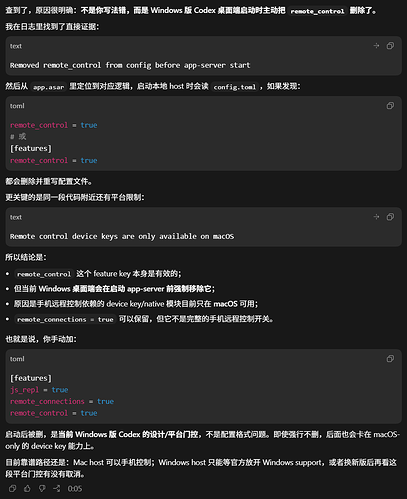
官方还未推进windows的app_control链路 写了个脚本,原理就是通过UAC加权的cmd启动codex.exe->把配置文件加上语句后设置为只读(在这之前要手动在配置文件加入 [features] js_repl = true goals = true remote_connections = true remote_control = true ) ->90秒后恢复可读,程序可写入参数